3 Ways to Connect Agentforce Agents and Slackbot to External MCP Servers


Design authentication and authorization to allow Agentforce agents and Slackbot to connect to external systems outside your Salesforce org.

Once you’ve mapped Slack and Salesforce identities and scoped your integration user, you might assume that your identity design is complete. Inside your Salesforce-Slack connection, it is. A Deep Dive into Slack and Salesforce Integrations for Salesforce Architects covers how that mapping works and how every layer built on top of it, from record channels to Agentforce agents installed in Slack, inherits it automatically.
However, the moment an Agentforce agent or Slackbot reaches through a Model Context Protocol (MCP) server into Snowflake, Google Drive, Docusign, or any other external system, Salesforce identity resolution stops applying as the only consideration for authentication and authorization. Every external system has its own authentication and authorization models.
This post walks through three ways to connect Agentforce agents and Slackbot to external systems, and for each one, what you need to design so authorization resolves correctly.
Understand the options for connecting Agentforce or Slackbot to external MCP servers
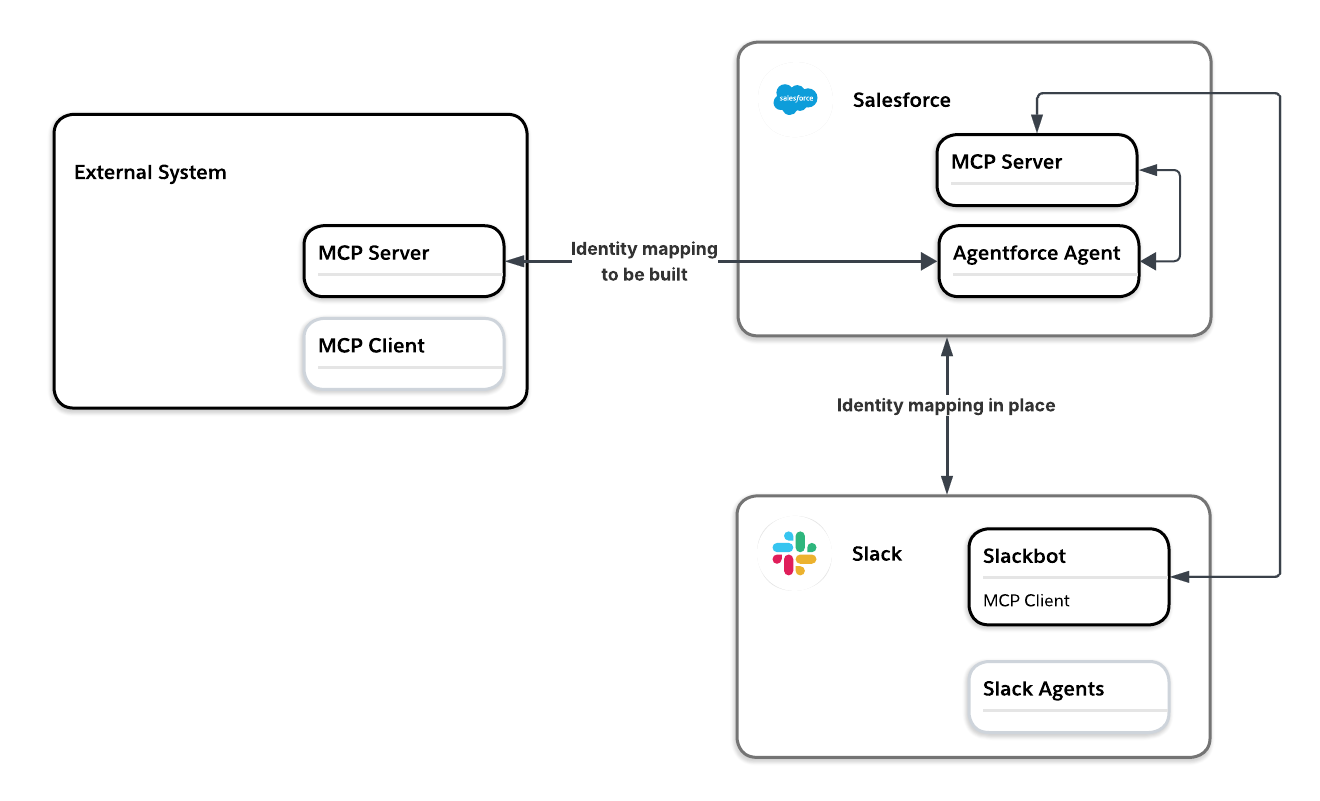
There are currently three ways to put an external MCP server in front of your Salesforce agents or Slackbot. One resolves external identity through Agentforce’s connection to an external MCP server. The second routes through the native Slack MCP client. The third uses the connection from Agentforce to external MCP servers but then exposes a selected subset of subagents to Slackbot.
In short, here are the options:
- Connect Agentforce agents to external MCP servers
- Connect Slackbot directly to external MCP servers
- Connect Agentforce agents to external MCP servers and then expose the Agentforce agents’ subagents (formerly known as topics) as tools to Slackbot
Let’s consider each of these options and the implications for authentication and authorization.
Option 1: Connect Agentforce agents to external MCP servers
Use this option when the agent needs to live inside your Salesforce org, or when it needs Salesforce context and external system context combined in a single reasoning chain rather than handed off in separate steps.
A single reasoning chain means the agent gathers everything it needs and weighs it together in one turn, producing one judgment rather than fetching from each source separately and leaving something or someone else to stitch the results together afterward.
For example, an agent assessing whether a forecasted deal is actually at risk needs the Salesforce close date and forecast category alongside the redline history sitting in an external Contract Lifecycle Management tool (CLM) or Docusign. Three rounds of redlines with two weeks left reads differently than the same three rounds with six weeks left, and to know that you need both contexts weighed together.
Understand authentication when connecting external MCP servers to Agentforce
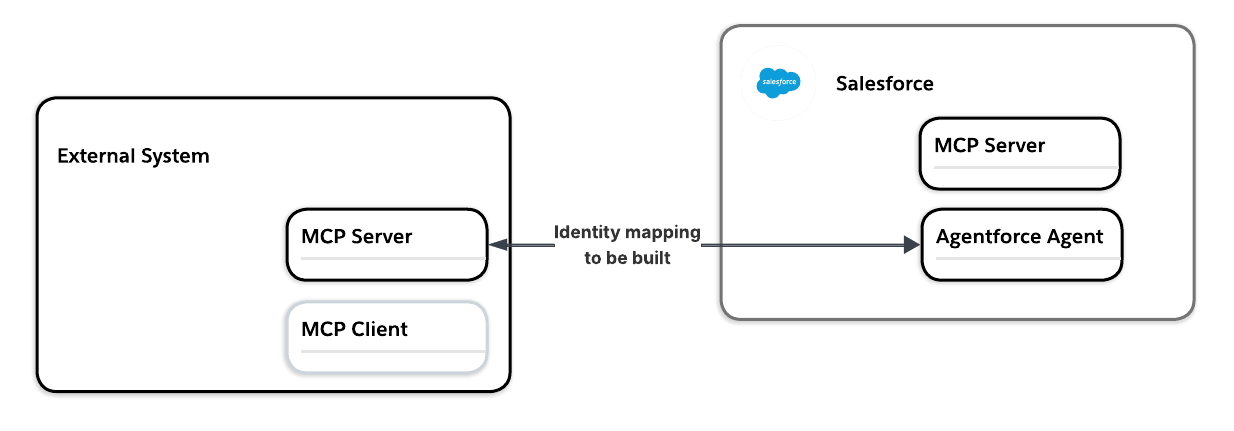
To connect an external MCP server to Agentforce, you register the external MCP server in the Agentforce Registry in Setup, and configure the server’s endpoint and authentication method. If the server requires authentication, it has to support OAuth 2.0. Depending on the OAuth flows supported by the external MCP server, you could be looking at either per-user authentication or a service account (client credentials flow), which is covered later in the post.
Verify this rather than assume. An MCP server compliant with the MCP specification publishes which OAuth grant types it supports at a standard discovery endpoint. Look for authorization_code if you need per-user resolution, client_credentials if you’re looking at a service account.
Resolve identity through the Salesforce per-user mechanism
With a per-user type configured (a named credential paired with an external credential using a Per-User Principal), each individual Salesforce user goes through a one-time OAuth consent flow the first time they trigger the connection, authorizing against the external system as themselves. Salesforce stores a separate token per user against that credential from then on.
This mirrors what End-User Identity Propagation in Agents describes as secondary authentication for cross-domain identity: when the external system has its own identity provider, no token exchange can bridge the gap, and the user has to authenticate there directly. This also means each Salesforce user needs a corresponding account in the external system connected via the MCP server before the connection can resolve for them.
Trusted Agent Identity for the Agentic Enterprise
As enterprises embrace the agentic paradigm, a new security challenge emerges: How does end-user identity flow through a network of autonomous AI agents? This fundamentals guide walks through the identity propagation challenge using a progressive series of scenarios, each introducing additional complexity.



Consider what the end user’s authorization in the external system means for the agent
Once identity resolves, the external system enforces its own permission model for that user. That means that you need to understand what the end user is able to do in the external system so that you can decide whether you want to grant the agent that same access on behalf of the end user. If auditing the end user’s own access in the external system isn’t something you’re prepared to take on, a scoped service account (covered later in this post in more detail) is the safer default.
Control which tools to share with Agentforce agents
Regardless of whether you use per-user or a service account, you also choose which specific tools from that server go to which agents, through each agent’s subagent configuration in Agent Builder.
This means that beyond the scope of the connecting user’s access, an agent doesn’t get blanket access to everything the server exposes just because the server is registered. You’re deciding tool by tool, agent by agent, which combinations of external capability and internal reasoning you’re actually willing to combine.
Option 2: Connect Slackbot directly to external MCP servers
Connect Slackbot directly to the external system’s MCP server when the task is Slack-native and doesn’t need Salesforce context. For example, pulling a Figma file, checking a PagerDuty incident, or drafting a Docusign envelope from a thread — none of that benefits from a Salesforce hop it doesn’t need.
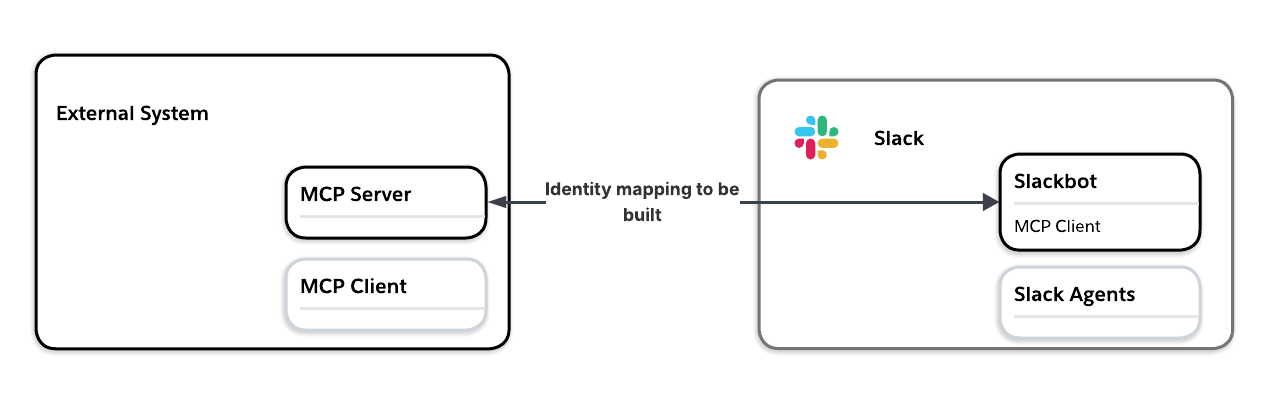
Here, the challenge becomes defining and managing the identity mapping between Slack and the external system.
Resolve identity through the native Slack MCP client
The Slackbot MCP client resolves identity the same way in principle (per-user), but through the native Slack MCP client rather than Salesforce named credentials. The Slackbot MCP client is now generally available (GA). It connects Slackbot to any app over MCP, through a registry in the Slack Marketplace. More than 20 partner apps are already live, including Atlassian, Box, Canva, Docusign, Linear, Notion, and Zoom.
Every MCP server enters a Slack workspace through three gates. A developer, either partner or internal, declares the MCP server in their Slack app manifest alongside an mcp:connect OAuth scope. An admin approves the app through a standard Slack App Directory review, seeing exactly which MCP server domains are being requested before signing off. After this, once a user connects, this triggers an OAuth flow whose resulting token is stored in the Slack credential infrastructure.
Understand the scope of access Slackbot gets through the user’s authorization
Just like in Option 1, every MCP call is made as the Slack user, mapped to their equivalent identity in the external system. So permissions, and access control are all applied at the source system, exactly as if that person had opened the tool directly.
As the architect, you need to decide whether that’s the access model you actually want: Slackbot acting in the external system exactly as if it were that user.
Control the tools that Slackbot can use
Similar to tool assignment in Agentforce, Slack also adds a second authorization layer to control what Slackbot can do. Write and delete tools require explicit, per-action user confirmation before Slackbot proceeds, and the current GA release activates read-only by default, so design any workflow that needs Slackbot to take action assuming a confirmation step is required.
Access control is also app-level only for now, approved for everyone with access to the app or no one. Granular scoping by user, group, or role hasn’t shipped yet, so if a pilot group or narrower rollout is what the design calls for, the Slack layer can’t currently enforce it.
A Deep Dive Into Slack and Salesforce Integrations for Salesforce Architects
Learn how to design Slack-to-Salesforce integrations for your Salesforce org, Agentforce agents, and Slackbot.
Option 3: Connect Agentforce agents to external MCP servers and then expose the Agentforce agents’ subagents as tools to Slackbot
What’s different in this scenario is that Slackbot doesn’t talk to the external system directly. It talks to the Agentforce agent tools and Agentforce manages the connection to the external MCP server.
Option 3 builds on Option 1. The integration between Slack and Salesforce determines the user mapping from a Slack user to a Salesforce user and the Agentforce connection from Option 1 controls access scope to the external MCP server.
Why would you even consider this option? One reason is that you have already connected your Agentforce agents to an external MCP server and you want to use the same connection for Slackbot. Maybe the Agentforce agent has specific reasoning that you want to also allow Slackbot to delegate to.
The reasoning built into Slack can’t be shaped as precisely as an Agentforce agent’s can through Agent Script, so if that precision matters for this use case, that’s a real reason to route through the agent instead.
In terms of authentication, this means that the identity between Salesforce and Slack is resolved using the default connection discussed in A Deep Dive into Slack and Salesforce Integrations for Salesforce Architects. The identity resolution for Agentforce is the one discussed in Option 1. The scope of access in the external system depends on the permissions granted there, whether the connection uses per-user authentication or a service account.
Treat service-account-only connections as all-or-nothing
When per-user authentication isn’t the right strategy, a service account is the other design option. The downside is that access isn’t scoped to the end user. But that can also be the upside: if the end user’s own access in the external system is broader or narrower than what you actually want the agent or Slackbot to have, a service account lets you set that boundary deliberately instead of inheriting it.
When an external system’s MCP server is connected via a service account, every call resolves to one credential regardless of who’s asking. The decision is binary, not a scoping exercise: is the data and action surface that the service account can reach something every user who can invoke the agent should already be able to see and trigger? If the answer is no for even one of those users, a service-account connection isn’t viable for that object or action, or the scope of the service account’s access needs to be adjusted.
Interestingly, if your external system does not really benefit from a per-user approach (maybe it only ever serves public or system-level data, reference data, general lookups), this applies in reverse. Don’t propagate a user-scoped identity to a system that doesn’t need one. Setting up a per-user connection could expand your attack surface and add a dependency on the identity provider for no benefit. In short, match the identity model to what the call actually requires, not to whichever option is easiest to configure.
Watch for a second pattern: the underlying system’s own capability may not match what a specific MCP server implementation defaults to. Some MCP server implementations use application permissions with a client credentials flow by default, collapsing to a service account even when the system behind them could support per-user access. This means that you need to verify the authentication mode of the specific MCP server you’re registering, not just what the system it connects to is capable of.
Per-user resolution inherits access; it doesn’t scope it on its own
Whichever option you choose, resolving identity through per-user OAuth doesn’t create a narrower boundary on its own. The agent inherits whatever the resolved user already has in the external system, on top of whatever tools you’ve granted in Agent Builder or gated through Slack controls. A tightly scoped tool grant doesn’t help if the user behind it is over-privileged on the other side of the connection.
Two things worth building into the design before any of these connections goes live:
- Audit the external system’s own entitlements; don’t assume your Salesforce access review covers it. A permission set review tells you nothing about what that same user can do in Docusign, Snowflake, or a CLM.
- Decide how the stored token gets revoked when access changes. Consider offboarding, a role change, or a permission revocation on either side; none of that automatically invalidates a token that was issued once and stored. If deprovisioning doesn’t already account for these connections, a stale token is a live credential nobody’s watching.
Where to go from here
- Read A Deep Dive into Slack and Salesforce Integrations for Salesforce Architects for the base connection and identity mapping decisions this article builds on throughout.
- Read End-User Identity Propagation in Agents for the enterprise-scale pattern this piece’s per-user and service-account distinction generalizes to, including how to handle an external system with a completely separate identity provider.
- Review the Slack Trust Center for the full compliance and certification detail behind the Slackbot MCP governance model.
Subscribe to the Salesforce Architect Digest on LinkedIn
Get monthly curated content, technical resources, and event updates designed to support your Salesforce Architect journey.