How to Design an AI-Native Architecture with Salesforce Headless 360


Work through the assumptions, decisions, and trade-offs behind designing a fintech AI agent built with Salesforce Headless 360.

Imagine an AI-native startup that needs to deliver highly personalized, real-time investment recommendations while navigating complex data security and governance requirements. As the architect, you are responsible for designing a system that connects this external agent to core customer data without sacrificing performance, compliance, or scalability. This is where Salesforce Headless 360 comes in.
In episode five of Think Like an Architect, we reconstruct the architectural thinking process for this scenario. Rather than focusing only on the finished architectural design, walking through this process helps strengthen the mental muscles architects use to evaluate requirements, weigh tradeoffs, and determine the right architectural approach for headless access and autonomous agents.
Use the “What, How, and Why” Approach
To design scalable solutions, we use a repeatable three-step method to move from raw business requirements to justified architectural decisions:
- What: Highlight key phrases in business requirements to paraphrase the essence of the problem into concise High-Level Requirements (HLRs). This helps ensure you solve the right problem from the start.
- How: Align technical solution options directly to your HLRs. Use live diagramming to visualize options and digital sticky notes to capture questions, assumptions, and decisions. It is vital to tie your assumptions to your decisions, as a decision may need to change if an assumption is later proven incorrect.
- Why: Document your justifications. Creating an Architectural Decision Record (ADR) ensures that stakeholders, and your future self, understand the rationale behind a specific direction.
Learn about the Think Like an Architect series
Design future-ready solutions in this interactive livestream series. Break down real-world scenarios, join live Q&As, and vote on the topics you want to see next.



What: From Business Requirements to High-Level Requirements
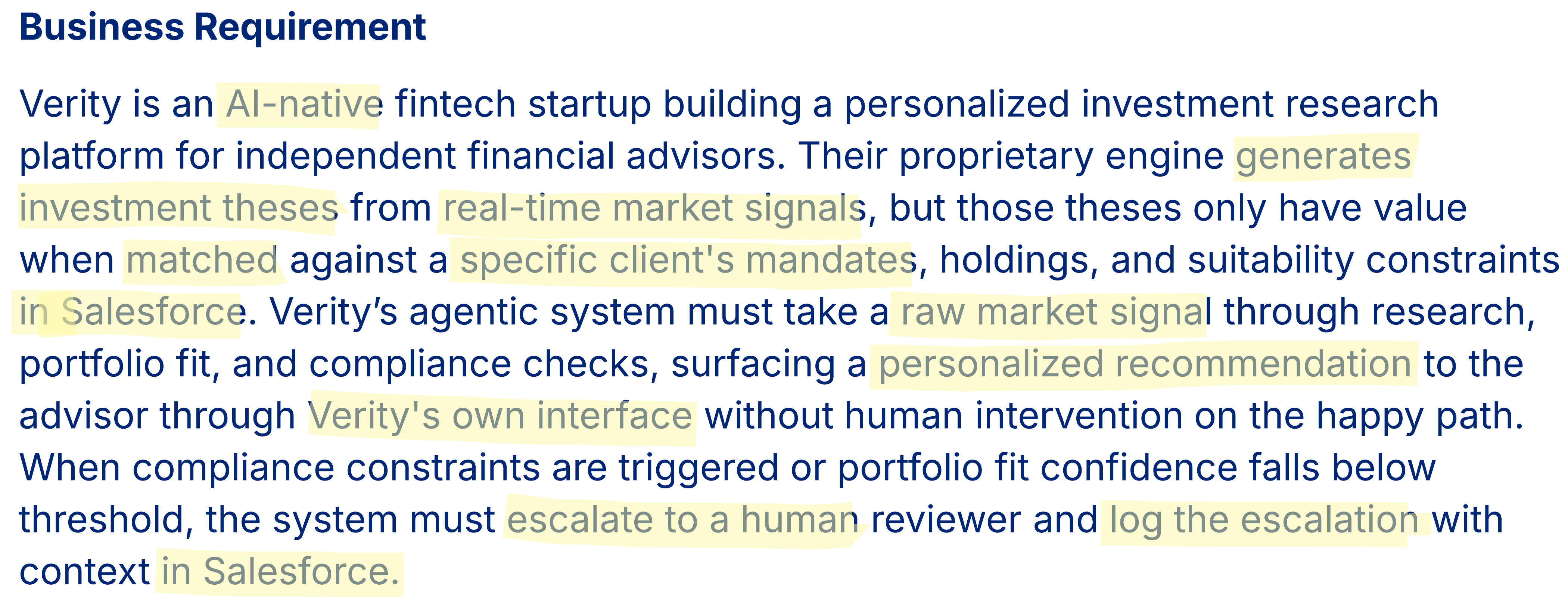
In the “What” step, let’s look at the specific challenge from episode five. We start with a raw business requirement and use highlighting to indicate the key parts, as shown below.
Paraphrase into HLRs
By highlighting key phrases, we strip away the business narrative to make sure we are solving the right problems from the start. Based on the AI-native agent scenario, we arrive at five clear HLRs:
- Ingest real-time market signals and generate raw investment theses.
- Retrieve client mandates, holdings, and suitability constraints from Salesforce.
- Evaluate each thesis against client context for portfolio fit and compliance.
- Surface personalized recommendations to the advisors through Verity’s own interface.
- Escalate to a human and log in Salesforce when compliance thresholds are not met.
Note that the HLRs paraphrase rather than use the exact words from the business requirement. This is essential in validating with the business stakeholders that you understood the intention of their requirement.
To continue with evaluating solution options, let’s move into the “How” step by following the trail of questions, assumptions, and decisions captured during our live session.




How: Aligning solutions to your HLRs
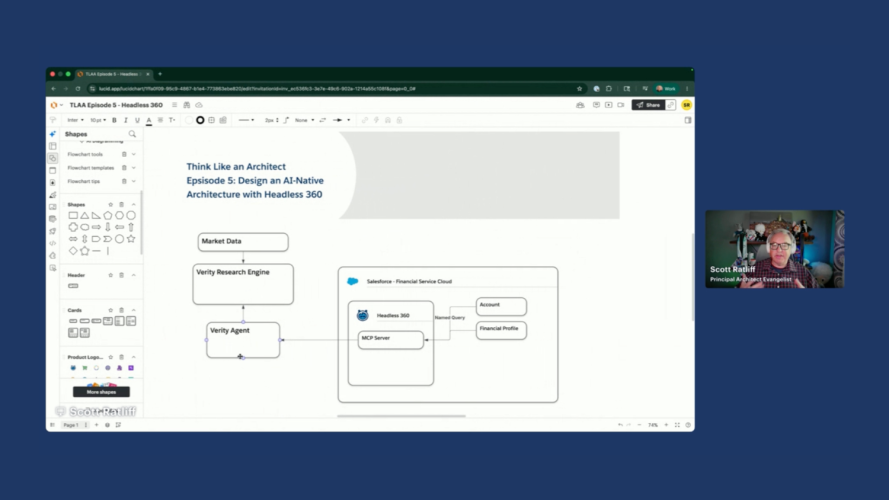
In the “How” step, we evaluate solution options against your HLRs. To keep our thinking organized, we track questions, assumptions, and decisions alongside our technical diagram.
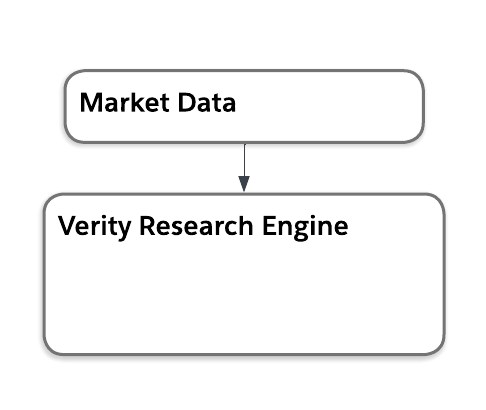
Evaluating HLR 1: Ingesting market signals and generating theses
We start by defining where the raw investment theses come from. Our first assumption is the research matching and generation is highly customized, proprietary intellectual property (IP). We decide to utilize Verity’s existing, proprietary research engine as the source for handling market signals and generating these theses, assuming the inner workings are not relevant for our architecture design.
Evaluating HLR 2 and 3: Retrieving client mandates and evaluating portfolio fit and compliance
Next, let’s tackle HLR 2 and HLR 3 together as we need to extract the appropriate data out of Salesforce and use it to evaluate for fit.
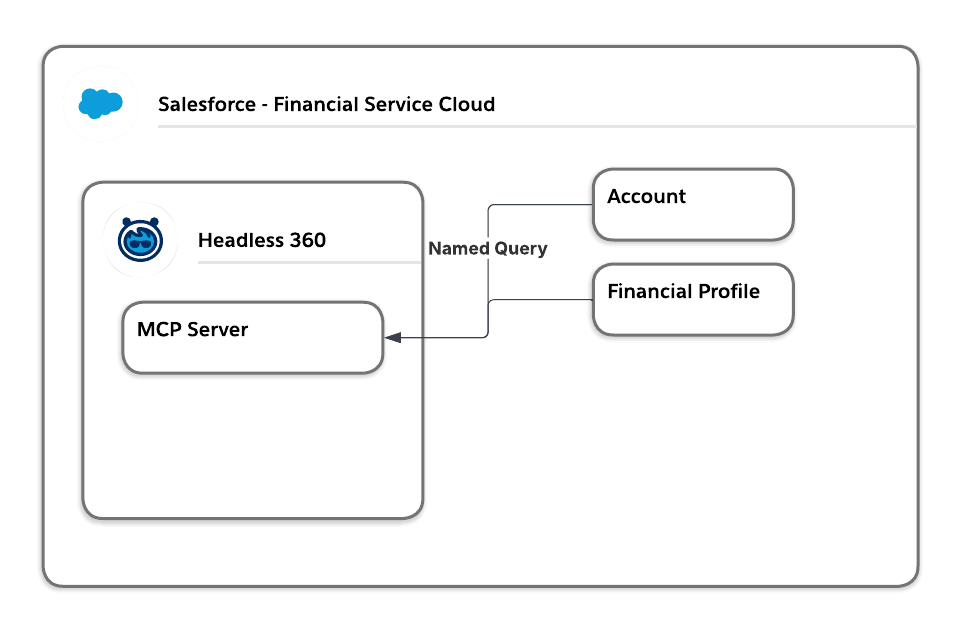
Retrieve client mandates, holdings, and suitability constraints from Salesforce
First, we determine which data to pull from Salesforce and how we want to do that.
- Evaluating Agentforce agent necessity: Since retrieving the data required neither natural language processing nor reasoning, we determined that an Agentforce agent was unnecessary for this step and chose to use Headless 360, specifically a Model Context Protocol (MCP) server instead.
- Limiting agent visibility: Assuming the need to tightly limit the agent’s capabilities to prevent broad visibility into sensitive customer holdings, we decided to use a named query to strictly limit the objects and fields the agent could access instead of using the standard
sobject-readsserver. - Enforcing a user security boundary: To ensure financial advisors could only view profiles for their own clients, the system needed to enforce this security boundary, driving the decision to connect to the MCP server using user context rather than a broad service account.
Evaluate each thesis against client context for portfolio fit
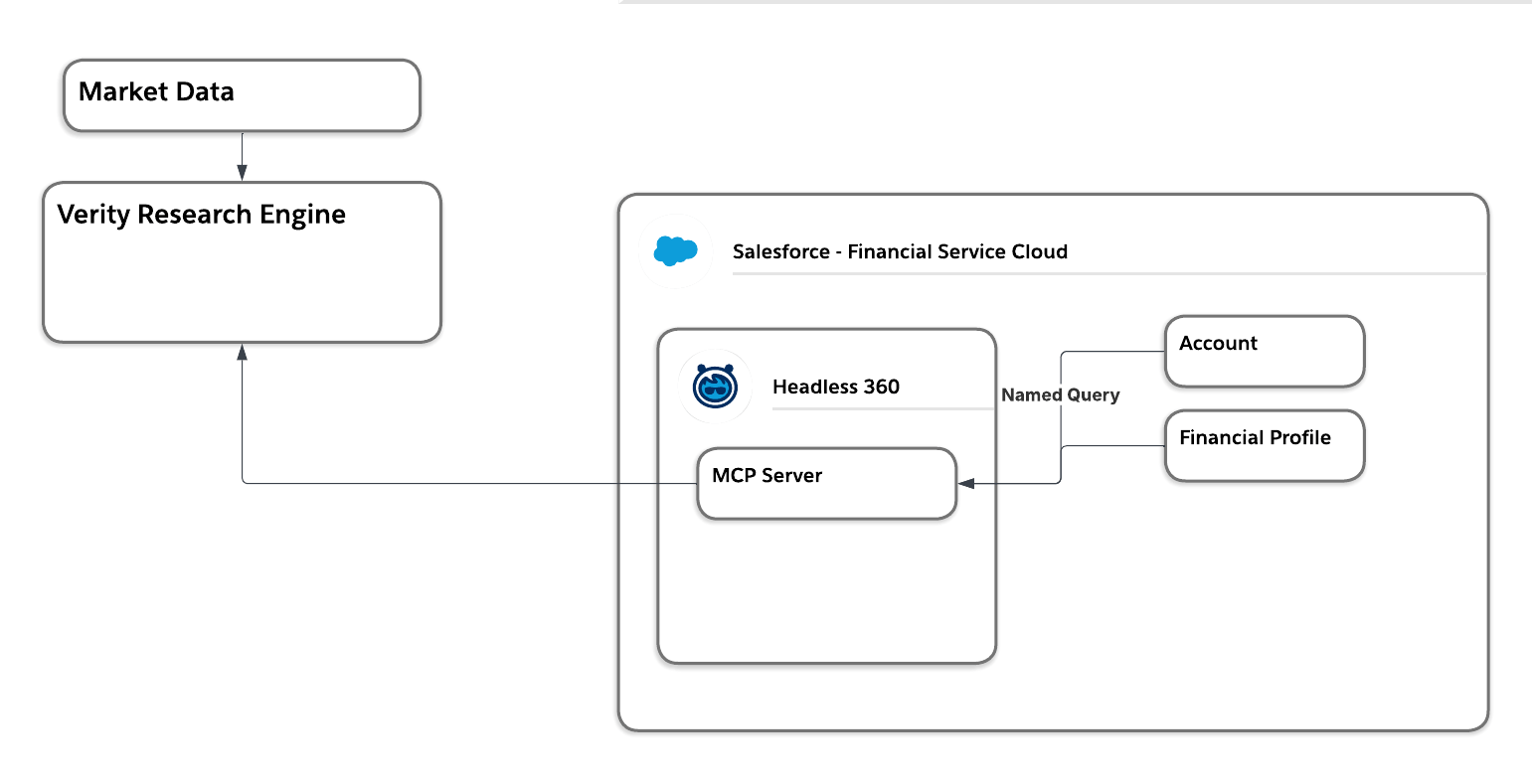
For portfolio fit, we assume the matching rules were also proprietary Verity IP. Rather than copying those rules and data into Salesforce, we decide to push the Salesforce constraints directly into the Verity engine to do the matching.
Evaluating HLR 4 and 5: Surfacing recommendations and handling escalations
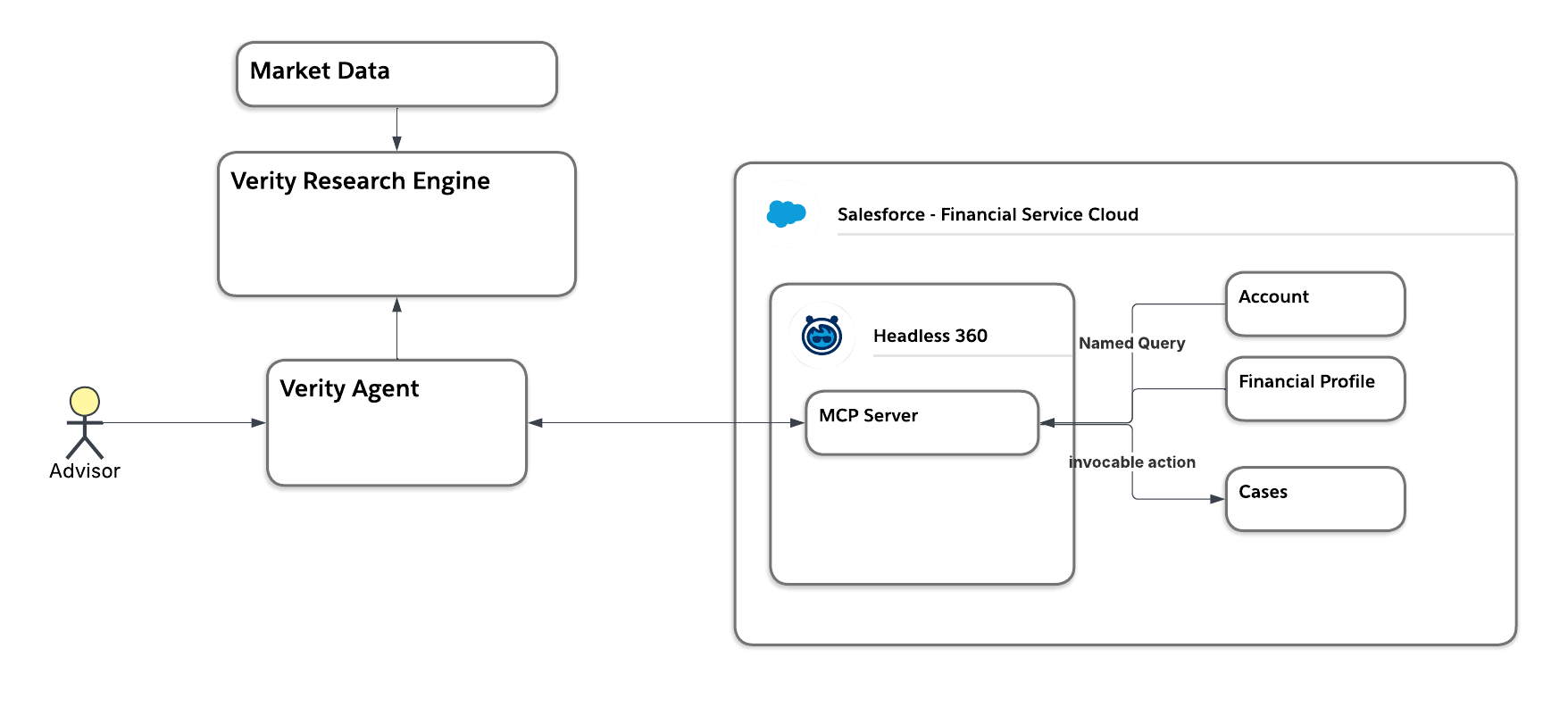
For the final pair of requirements, we need to focus on the user interface and how to handle compliance failures. Since Verity is an AI-native company, we ask how the user will interact with the data and make the assumption they already have a human-facing custom agent for their advisors. We decided this agent will act as the core orchestration layer, pulling constraints from Salesforce via the MCP server and fetching matched theses from the Verity research engine.
If a compliance match fails, we need the agent to escalate and to log an issue. We ask where to log the issue, and assume that using the Salesforce Case object is the best method for both escalation and reporting. This led to the decision to have the agent write a case back to Salesforce. Similar to our read access decision, we ask if we should use the standard sobject-mutations. We assume giving the agent broad rights to update any object the user can access is far too risky, as we don’t want the agent autonomously selling holdings. This leads us to decide against standard tools and instead build a custom MCP server using an invocable action, applying the principle of least privilege to safely log the case without granting full write access.
Why: Justify Your Design with Architectural Decision Records
In the “Why” step, you justify your direction to stakeholders and your future self. An architect’s value is not only in designing an optimal solution, but also in their ability to explain and justify the rationale. With the questions, assumptions, and decisions we captured, we can apply the guidance in the Architectural Decisions: A Human-Led, AI-Powered Approach blog post on how to create an ADR with the help of LLMs.
We use the notes we took in the “How” step to:
- Tie assumptions to decisions: A decision may need to change if an assumption is later proven incorrect. For example, if the Verity agent doesn’t have orchestration capabilities, our integration may need other tools like MuleSoft Agent Fabric.
- Document the “thinking work”: Whether you present a complex diagram or a simple slide, the most important part is that the thinking work, including questions, assumptions, and decisions, is documented.
Expert Q&A
During the session, Leo Tran, Salesforce Distinguished Architect and Chief Architect of Platform Engineering, and Carl Brundage, Salesforce Distinguished Technical Architect, joined us to dive deeper into Headless 360 and MCP. Below are some key questions and answers from the session.
Understanding Headless 360 and MCP
- If Salesforce is API-first, what is the difference since going headless? Salesforce isn’t just accessed through a browser or system integrations anymore; it’s in Slack, Microsoft Teams, and ChatGPT. Embracing the MCP standard means transforming to be agent-first, sharing resources and prompts across various agentic interfaces. Unlike traditional API integrations, which force AI to guess how to navigate raw data endpoints, Headless and MCP provide external agents with precise, labeled instructions. These schemas empower agents to execute business processes intelligently, eliminating trial and error.
- What does an MCP server offer over traditional APIs? Traditional APIs are like a “dumb phonebook” of endpoints that an agent has to reverse engineer. An MCP server works specifically for agents and acts as a semantic toolkit with labels, providing the agent with descriptions, schemas, and suggestions on exactly how and when to use the tools.
- Why use Headless 360 instead of Agentforce? It depends on where your customers are interfacing. Verity is an AI-native company with its own proprietary agent. That proprietary IP isn’t well suited to move into Salesforce. If Verity later wanted to distribute that experience via Slack or a website, Agentforce could serve as the distribution layer, but Headless allows them to bring Salesforce into their established interface.
Security, governance, and access control
- Why use named queries instead of giving the agent free SOQL access via
sobject-reads? If you use the standard server, the agent can read everything the connected user can read. If you want the agent to do less than the user (for example, if a user can see financials, but the agent shouldn’t), you must use a custom MCP server with named queries. This scopes the agent’s access to only specific fields and objects with fixed criteria. - How do you restrict sensitive objects? First, restrict user access with permission sets and sharing rules. If the user needs access to the data but the agent shouldn’t have it, then control the APIs the agent can call. Using custom MCP servers with named queries restricts the agent to doing less than the user can, ensuring strict governance.
- How can we prevent a user from taking their login configuration and using a personal, open LLM to pull PII data via MCP? Admins can use multiple layers of security to prevent this from happening. First, restricting the External Client Apps creation to authorized personnel only, effectively barring non-admins from connecting outside agents via MCP. Second, disabling the “API Enabled” permission for any users who do not require direct API access. Salesforce has also retire legacy SOAP API logins to eliminate userid/password API based logins. For users who have authorized access, implement Shield Event Monitoring and Transaction Security policies to proactively detect and block unsanctioned data retrieval. The only truly secure strategy is to provide a sanctioned, enterprise-grade AI path that ensures zero data retention.
Implementation and readiness
- I currently use a traditional Sales Cloud setup with standard record pages. What should I expect when moving to a Headless 360 architecture, and what are the hurdles? Standard UI pages remain appropriate for rich data layouts. To prepare, identify gaps and experiment with Slackbot where actions or data don’t yet exist in Salesforce, as the agent won’t be able to use them headlessly.
- How do you actually implement access restrictions for the MCP server itself? Implementation requires a layered approach: use External Client Apps to grant API access to specific profiles, disable the API Enabled permission for unauthorized users, and use Salesforce Setup to declaratively activate or deactivate specific MCP servers.
Subscribe to the Salesforce Architect Digest on LinkedIn
Get monthly curated content, technical resources, and event updates designed to support your Salesforce Architect journey.



Final wrap-up
An important takeaway for any architect is that while we traditionally start with the simplest functionality, when you need more granular security controls than are provided out-of-the-box, moving from standard to custom MCP servers with named queries and invocable actions is the justified architectural choice.
A second crucial takeaway is the value of your documented decision log. A centralized, easily accessible record of why you made specific architectural choices is a vital asset for helping stakeholders understand your approach. Furthermore, it saves your future self from having to rifle through old emails months later as you try to reconstruct the reasoning behind a design.
- Next Episode: Join us for the next episode on June 25, where we will apply the What/How/Why approach to a new real-world challenge.
- Vote on future episodes: Help us shape the future of the series. Tell us what topics you want to see and how we can provide more value to you.